
Auto Monkey
Auto MonkeyAuto & Vehicles
3.741.00 Reviews
- Version
- 3.6.0
- Installs
- 10.00K
- Age Rating
- Everyone
Screenshots
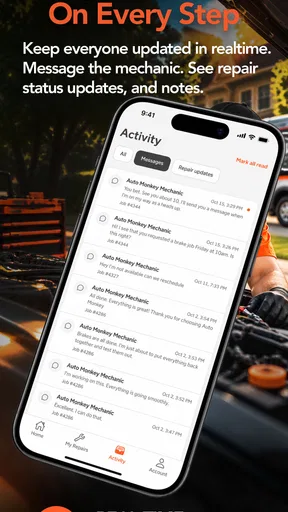
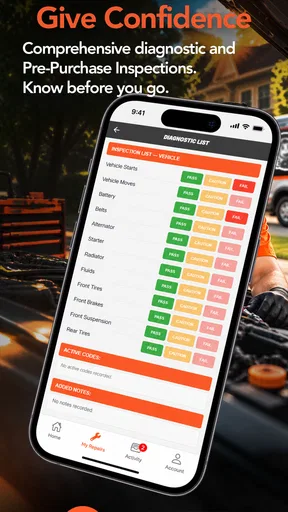
Our Review of Auto Monkey
 Analysis by Appyee
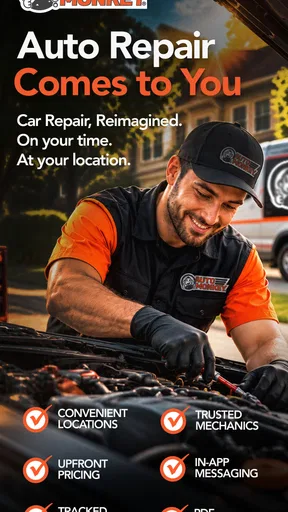
When a car problem interrupts an ordinary day, the hardest part is often not knowing what is broken. It is finding a mechanic who can respond without turning a small issue into a long trip, a queue, and an uncertain bill. Auto Monkey, a free Auto & Vehicles app from Auto Monkey, takes a mobile-first approach by connecting the need for a repair with mechanics who come to the customer. I found that its main appeal is not flashy technology; it is the attempt to move the repair conversation from the workshop to the place where the vehicle is already parked.
That difference matters most when the car cannot safely be driven. A flat tire, a weak battery, or a warning light that appears before work can create a practical problem as much as a mechanical one. An app built around bringing help to the vehicle can remove one awkward step from that situation. At the same time, the usefulness of this kind of service depends heavily on connectivity, location details, mechanic availability, and how clearly the issue is communicated. Auto Monkey is promising for convenient fixes, but it is not a substitute for every kind of garage visit.
How the mobile mechanic idea works in everyday use
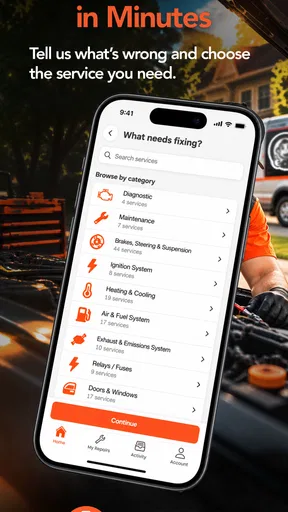
My first impression is that Auto Monkey makes the most sense when convenience is part of the repair itself. Instead of beginning with a search for a nearby garage and then arranging transport, I would use the app while standing beside the vehicle, entering the problem and the place where assistance is needed. That workflow is especially practical for people who do not have another car, cannot leave the vehicle unattended, or are dealing with a problem in a driveway, workplace parking area, or other permitted location.
The app is aimed at a broad audience rather than a specialist group. Its Everyone content rating makes it approachable for ordinary drivers, including someone who rarely thinks about maintenance until a problem appears. I would still expect the best results from a user who can describe the symptoms clearly: whether the engine turns over, whether a dashboard light is showing, whether the vehicle is blocking traffic, and whether the car is in a safe place. Those details can make the difference between a useful request and an exchange of follow-up messages.
One useful habit is to inspect the vehicle before submitting a request, if doing so is safe. I would note the exact parking position, take clear photos of visible damage or a warning message, and write down what happened immediately before the failure. This is more helpful than simply typing “car broken.” It gives the mechanic a starting point and may reduce the chance of arriving without the right tools or parts. The app can begin the connection, but the quality of the information still comes from the driver.
Where connectivity becomes part of the repair
Because the service is designed around reaching a person at a vehicle, a reliable connection is important during several stages. The request itself may need network access, and communication can matter just as much afterward. A mechanic may need clarification about the car’s position, the symptoms, or whether the vehicle can be moved. If the connection is weak in an underground car park, a rural roadside, or a crowded event area, the experience may become slower precisely when the driver is already under pressure.
I would prepare for that possibility before relying on the app in an unfamiliar place. Keeping the vehicle’s location visible, saving any relevant vehicle details where they are easy to find, and making sure the phone has enough battery are sensible precautions. These are not special tools inside Auto Monkey; they are practical habits that support a network-dependent service. If the phone is nearly dead or the signal disappears, even a well-designed request can become difficult to complete.
Connectivity also shapes expectations. A mobile mechanic service is not the same as an instant roadside rescue button. The app can help start the process, but a response still depends on the situation, the location, and the available mechanic. I would avoid treating the app as a guarantee that someone will arrive immediately. For a dangerous roadside position, a dedicated emergency service is the more appropriate first choice, while Auto Monkey is better suited to a repair request in a reasonably safe setting.
Useful mobile contexts beyond a breakdown
The obvious scenario is a vehicle that will not start, but I think the app may be even more comfortable for smaller jobs that are inconvenient rather than dramatic. A driver could use it when a car is parked at home and needs attention, when a busy schedule makes a garage appointment difficult, or when moving the vehicle would risk making the problem worse. Bringing the mechanic to the car can save time without requiring the driver to arrange a ride back from a workshop.
Consider a realistic weekday example. I might discover that my car will not start before leaving for work. If it is parked safely in my driveway, I can use the app to explain the symptoms, provide the location, and continue preparing for the day while waiting for a response. The benefit is not only avoiding a tow; it is keeping the repair attached to the vehicle’s actual location. If the car is in a narrow underground space or a place where a service vehicle cannot work safely, however, a conventional garage or towing option may be more suitable.
Another mobile use is checking a problem while travelling between places. The phone is already the natural tool for sharing location and describing what has happened, but travelling can also make the request less precise. I would stop somewhere safe before using the app, rather than trying to enter details while driving. A map pin that looks correct on a phone may still leave a mechanic searching in a large parking lot, so a nearby landmark or parking-row description can be valuable in the written request.
There is also a privacy and practical consideration whenever a location-based repair request is made. I would choose a safe, permitted place and avoid assuming that any roadside shoulder, private lot, or restricted car park is suitable for a service visit. The app may help connect the driver and mechanic, but it cannot change local access rules or make an unsafe location safe. Thinking through that part before requesting help prevents a connectivity problem from becoming a location problem.
What happens when the first attempt does not go smoothly
The most important test for this kind of app is not the ideal request; it is recovery after something goes wrong. A mechanic may need more information, the phone may lose signal, or the car may be moved before the appointment is complete. I would keep the original description short but specific, then be ready to update the location or symptoms if circumstances change. Clear communication is more useful than sending several vague messages.
If the request appears to stall, I would first check the basics: connection, battery, notification access, and whether the phone is still showing the correct location. I would also keep a record of what I have already explained so that I can repeat the essential details without starting from scratch. This is one of the less obvious trade-offs of a mobile service: it reduces the need to travel to a garage, but it makes the phone an important part of the repair chain.
Recovery is also about knowing when to stop using the app as the primary solution. If the vehicle is positioned dangerously, smoke or fuel is involved, someone is injured, or the situation requires emergency assistance, safety should come before arranging a routine mechanic visit. Likewise, a major mechanical failure may require workshop equipment that cannot reasonably be brought to a parked car. Auto Monkey is more convincing for mobile repairs and practical assistance than for every complex diagnosis.
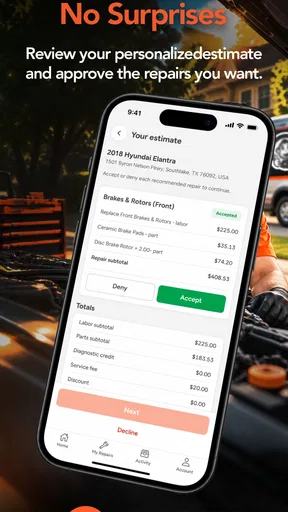
I would ask for a clear explanation of the proposed work before agreeing to it, especially when the initial symptoms are uncertain. A mobile visit can identify a fault, perform a suitable repair, or reveal that the vehicle needs to go elsewhere. Those are different outcomes. The app’s convenience should not encourage a driver to approve work without understanding what the mechanic believes is wrong, what can be done on-site, and what the next step will be if the repair cannot be completed there.
Using the app without wasting mobile data
Auto Monkey is not the kind of app I would open repeatedly just to browse. Its value appears when there is a specific vehicle problem and a real need to contact a mechanic. That makes data-conscious use fairly straightforward: prepare the essential information first, use a stable connection when possible, and avoid sending unnecessary large files. A few well-chosen photos of the dashboard or visible damage may communicate more effectively than a long stream of repeated updates.
When I have access to Wi-Fi, I would use it for any preparation that does not need to happen at the roadside. At the actual vehicle, I would keep messages focused on information that can change the outcome: the exact location, the vehicle’s condition, and whether the car can be moved. This approach is not only kinder to a limited data plan; it also makes the request easier for a mechanic to understand quickly.
Location sharing deserves particular care. A precise position can help a mobile mechanic find the car, but I would review the location before sending it and make sure it refers to the vehicle rather than the phone’s previous position. In a multi-level car park, the floor and entrance may be as important as the map point. If the signal is unreliable, a written landmark can provide useful backup. That small preparation is a concrete advantage in places where a map alone is ambiguous.
Battery use is another part of the connectivity picture. Navigation, messaging, camera use, and a weak signal can all make a phone work harder. I would take the needed photos before leaving the vehicle, carry a charging option when possible, and avoid closing the communication channel until the mechanic has enough information. A dead phone can cut off the very service intended to make the breakdown easier, so this is worth treating as part of the workflow rather than an afterthought.
Who will appreciate it, and who should choose another route
I see Auto Monkey as a good fit for drivers who value convenience, have a vehicle in a reachable location, and prefer to avoid an unnecessary trip to a workshop. It may be especially helpful for people with limited transport options, parents managing a busy schedule, or anyone whose car has failed at home rather than in a place where towing is immediately required. The mobile approach can also be useful when the problem is likely to be manageable with tools brought to the vehicle.
I would be more cautious if I needed a highly specialized diagnosis, extensive bodywork, a lift, or a repair that obviously requires workshop machinery. In those cases, a traditional garage has a structural advantage. A driver who wants to compare several written estimates, inspect a large service department, or maintain an established relationship with a local technician may also prefer the usual route. Auto Monkey is not automatically better; its advantage is convenience at the vehicle’s location.
It is also not the right first choice for an emergency that involves immediate danger. A normal repair request should not replace emergency services, roadside safety procedures, or a tow when the vehicle is obstructing traffic. I would use it when the situation is controlled enough to communicate, wait, and receive a mechanic safely. That distinction keeps the app in its strongest role instead of asking it to solve a problem it was not designed to handle.
What the current app details suggest about access
Auto Monkey has been available since January 15, 2021, and the current version is 3.6.0. It runs on Android 6.0 or later, which makes it accessible to people using older compatible phones rather than requiring a recent device. The app is free to install, although I would still treat the repair itself as a separate practical and financial decision and ask for the expected work before approving anything.
Its presence is established but not enormous: it has passed ten thousand installs, with an average rating of 3.7 from around eighty ratings and roughly forty reviews. I read that as a reason to approach it with measured expectations. There is enough public use to make the concept worth considering, but the rating does not suggest that every user will have a frictionless experience. Location, mechanic response, communication, and the seriousness of the vehicle problem can all affect the result.
The developer name shown for the app is Auto Monkey, which is easy to recognize when checking that I have selected the intended service. Since the app belongs to a focused Auto & Vehicles category, I would not expect the broad feature set of a general navigation, insurance, or vehicle-maintenance platform. Its value is narrower and clearer: helping arrange mobile mechanical assistance. That focus is a strength when the need matches it, but it also means I would not install it expecting a complete ownership dashboard.
My connectivity verdict
After looking at the way the service fits into real situations, I think Auto Monkey is most useful as a practical contact point for repairs that can happen where the car is parked. The strongest benefit is avoiding an unnecessary drive or tow for a problem that a mobile mechanic can address. The main weakness is that the experience is tied to a working phone, a usable connection, a clear location, and a situation safe enough to wait for assistance.
I would keep it in mind for a driveway failure, a non-starting car in a permitted parking area, or a repair that is inconvenient to transport. Before relying on it, I would prepare the vehicle details, capture concise evidence of the symptoms, confirm the location, and keep the phone charged. Those steps make the service more dependable without pretending that connectivity can solve a complex mechanical fault.
My honest recommendation is to see Auto Monkey as a convenient mobile-mechanic option, not an all-purpose emergency solution. If bringing help to the car is the part that saves you time, it deserves consideration. If the vehicle needs workshop equipment, the location is unsafe, or communication is unreliable, a garage, tow provider, or emergency service will probably be the better choice. For the right everyday breakdown, though, the app offers a sensible way to start a repair without immediately moving the vehicle.
Verdict
Strengths of Auto Monkey
- Simple interface makes core features easy to find.
- Lightweight design should run smoothly on many devices.
- Quick access to automated actions saves repetitive effort.
- Useful for users who prefer hands-free task management.
- Clear visual feedback helps track ongoing activity.
Limitations of Auto Monkey
- Automation may require accessibility or special permissions.
- Some features can behave differently across Android versions.
- Background activity may increase battery consumption.
- Limited customization may frustrate advanced users.
- Use carefully, as automated actions could trigger unintended results.
Similar Picks in This Category
View All
Android Auto
Google LLC4.1

maxim — order a taxi & food
PT. SITO4.7

Штрафы ГИБДД: проверка с фото
Pays LLC – Штрафы ГИБДД4.7

Номерограм – проверка авто
Авто Ассист4.8

Дром Авто
Дром4.9

Frequently Asked Questions
What is Auto Monkey and what can I use it for?
Auto Monkey is an automation-focused Android app designed to help users perform repetitive actions with less manual interaction. Depending on the version and device, it may assist with tasks such as tapping, swiping, opening screens, or repeating predefined routines. It is most useful for simple, predictable workflows, but it should not be treated as a universal automation tool for every app or situation.
Does Auto Monkey require root access or special permissions?
Auto Monkey commonly relies on Android accessibility or overlay permissions to recognize screen elements and perform taps and gestures. Root access may not be required for its basic functions, although some advanced features can depend on the device, Android version, or the app’s configuration. Before using it, review every permission request carefully and grant only the access needed for the automation you intend to create.
Is Auto Monkey safe to use on my phone?
The app can be safe when downloaded from a trustworthy source and configured responsibly, but automation tools naturally receive powerful permissions. Accessibility access may allow an application to view screen content and interact with other apps, so users should avoid installing modified APK files or granting unnecessary access. It is also wise to check the developer information, privacy policy, reviews, and requested permissions before proceeding.
Can Auto Monkey automate games or other third-party applications?
Auto Monkey may be able to repeat taps, swipes, and other touch actions in compatible games or applications, but results vary considerably. Some apps block overlays, detect automated behavior, change their interface, or require actions that the tool cannot reliably reproduce. Using automation in online games or services may also violate their terms and could lead to warnings, account restrictions, or suspension, so users should check the relevant rules first.
What should I know before downloading and setting up Auto Monkey?
Before downloading Auto Monkey, make sure your device runs a compatible Android version and has enough storage and battery for repeated operations. The initial setup may require accessibility, overlay, or notification permissions, and creating a reliable routine can take some trial and error. Test automations in a low-risk environment, keep the app updated, and disable its permissions when you are not using it if privacy is a concern.
